
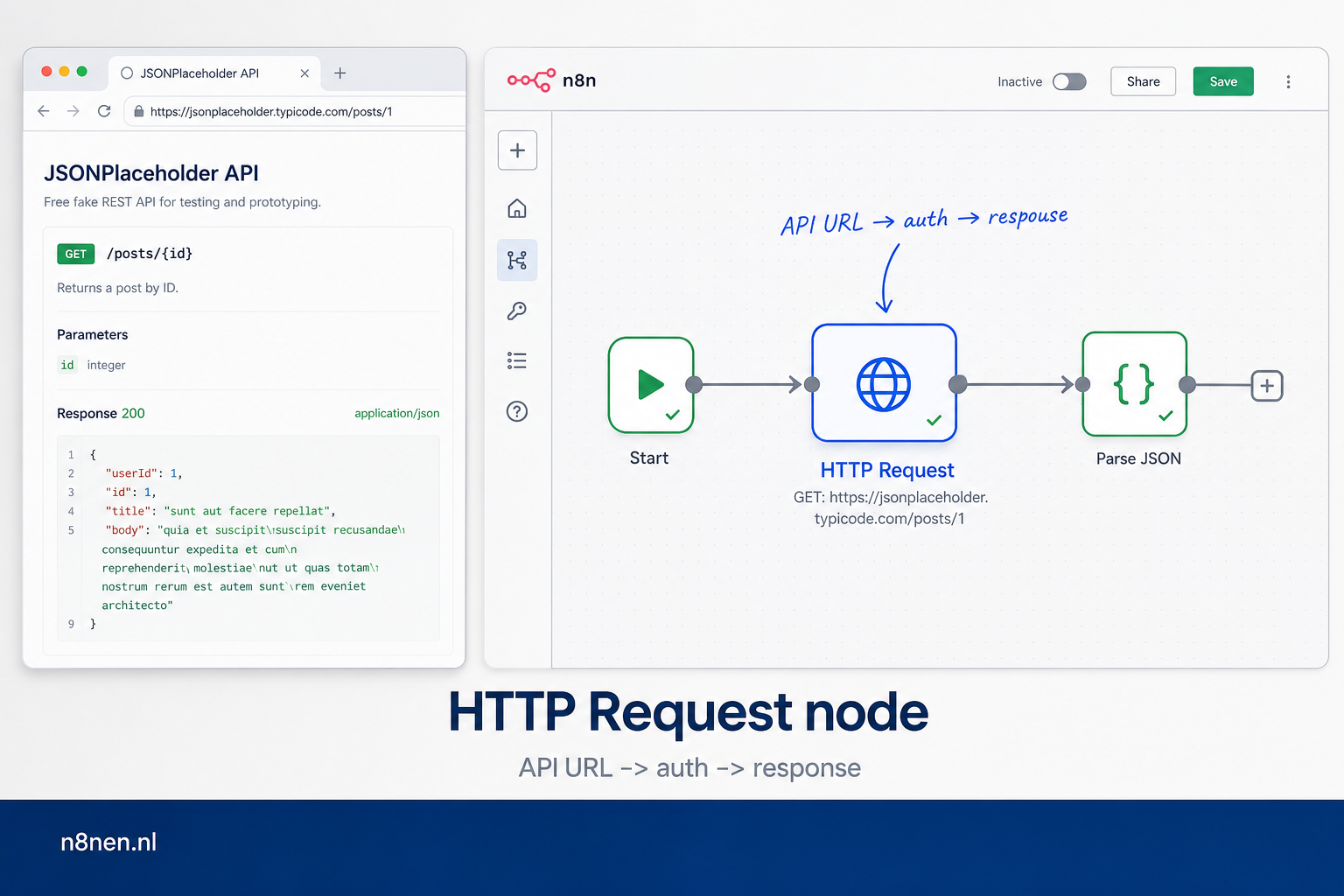
HTTP Request node: official docs of praktijkgids?
Gebruik de officiële n8n docs om velden en nodegedrag te controleren. Gebruik deze gids om te beslissen hoe je een echte API-call opzet: URL, methode, auth, headers, body, retries en response parsing.
Begin niet met pagination of foutafhandeling. Laat eerst één request stabiel slagen, zet daarna pas rate limits, retries en logging aan.
Snelste diagnose bij een API-fout
Krijg je geen bruikbare response terug? Werk dan niet meteen aan pagination of complexe expressions. Test eerst deze volgorde:
- URL en methode: klopt het endpoint en gebruik je GET, POST, PUT of DELETE zoals de API verwacht?
- Authenticatie: staat de token op de juiste plek: credential, bearer header, API-key header of query parameter?
- Response: komt er JSON terug dat de volgende node kan lezen, of moet je eerst een veld uitpakken?
Deze volgorde voorkomt dat je een n8n-probleem zoekt terwijl de API simpelweg een andere auth-header verwacht.
API documentation URL: required of optional?
In de HTTP Request node is de request URL verplicht: dat is de endpoint-URL die n8n moet aanroepen. Een documentatie-URL is geen apart verplicht n8n-veld, maar wel je bron om methode, authentication, headers, query parameters en body correct in te vullen.
- URL: de echte API endpoint, bijvoorbeeld
https://api.example.com/v1/customers. - Method: GET voor ophalen, POST voor maken, PATCH/PUT voor aanpassen.
- Headers: vaak nodig voor bearer tokens, content type of versieheaders.
- Query parameters: handig voor filters, pagination en search.
Gebruik de officiële n8n HTTP Request node docs voor veldnamen en deze gids voor praktische Nederlandse voorbeelden.
HTTP Request node docs: belangrijkste velden
De officiële n8n docs behandelen alle parameters. In de praktijk begin je met de verplichte URL, daarna kies je method, authentication, query parameters, headers en body. Gebruik deze uitleg als Nederlandse vertaalslag naast de officiële documentatie.
- URL: het API-endpoint dat je wilt aanroepen.
- Authentication: kies bij voorkeur predefined credentials als n8n die aanbiedt; anders Basic, Header, Bearer, OAuth of Query auth.
- Query parameters: filters of paginering in de URL, bijvoorbeeld
?page=1&limit=50. - Headers en body: stuur content-type, tokens, JSON, raw data of bestanden mee afhankelijk van de API.
- Pagination en batching: gebruik
$pageCount, responsevelden of batch interval om API-limieten netjes te respecteren.
Waarom de HTTP Request Node Essentieel is
De HTTP Request node is het Zwitserse zakmes van N8N. Waar andere nodes specifiek gebouwd zijn voor één service (zoals Slack of Google Sheets), kan de HTTP Request node met elke API ter wereld communiceren. Dit maakt het de meest flexibele en krachtige node in je automatisering toolkit.
Met meer dan 15.000 publieke APIs beschikbaar in 2025, van AI services tot payment providers, is de HTTP Request node je gateway naar oneindige integratiemogelijkheden. Of je nu werkt met een obscure startup API of een enterprise systeem zonder native N8N integratie, deze node maakt het mogelijk.
Core Functionaliteit: Wat Kan de HTTP Request Node?
1. Alle HTTP Methods
De node ondersteunt alle standaard HTTP methods:
- GET - Data ophalen (meest gebruikt)
- POST - Nieuwe resources aanmaken
- PUT - Bestaande resources volledig updaten
- PATCH - Gedeeltelijke updates
- DELETE - Resources verwijderen
- HEAD - Alleen headers ophalen
- OPTIONS - Ondersteunde methods checken
2. Request Configuratie
Elke request kan volledig gecustomized worden:
| Onderdeel | Functie | Voorbeeld |
|---|---|---|
| URL | Endpoint adres | https://api.example.com/v2/users |
| Headers | Metadata voor request | Content-Type: application/json |
| Query Parameters | URL parameters | ?page=1&limit=50 |
| Body | Request data | {"name": "John", "email": "[email protected]"} |
| Timeout | Max wachttijd | 30000ms (30 seconden) |
Authenticatie: Veilig Verbinden met APIs
N8N's HTTP Request node ondersteunt 8 verschillende authenticatie methodes, waardoor je met vrijwel elke API kunt werken:
1. Basic Authentication
Username: api_user
Password: secret_password
// Wordt automatisch omgezet naar:
Authorization: Basic YXBpX3VzZXI6c2VjcmV0X3Bhc3N3b3Jk
2. Bearer Token
Token: sk_live_abc123xyz789
// Resulteert in header:
Authorization: Bearer sk_live_abc123xyz789
3. API Key Authentication
Flexibel te configureren als:
- Header:
X-API-Key: your_api_key - Query parameter:
?apikey=your_api_key - Body parameter:
{"api_key": "your_api_key"}
4. OAuth2
Volledig OAuth2 flow support met:
- Authorization Code flow
- Client Credentials
- PKCE voor extra beveiliging
- Automatische token refresh
5. Custom Headers
Voor APIs met unieke authenticatie requirements:
X-Custom-Auth: combined_token_123
X-Account-ID: acc_456
X-Timestamp: 1706608800
6. Digest Authentication
Voor legacy systemen die digest auth vereisen (automatisch challenge-response handling).
7. SSL Certificates
Client certificate authentication voor enterprise APIs:
- PEM certificate upload
- Private key configuratie
- Optional passphrase support
8. AWS Signature v4
Voor AWS services zonder SDK:
Access Key ID: AKIAIOSFODNN7EXAMPLE
Secret Access Key: wJalrXUtnFEMI/K7MDENG/bPxRfiCYEXAMPLEKEY
Region: eu-west-1
Paginering: Grote Datasets Efficiënt Verwerken
Veel APIs retourneren data in pagina's. De HTTP Request node heeft 3 ingebouwde paginering modes:
Mode 1: Response Contains Next URL
Voor APIs die de volgende URL in de response meegeven:
{
  "data": [...],
  "next": "https://api.example.com/users?page=2",
  "previous": "https://api.example.com/users?page=0"
}
Configuratie:
- Pagination Mode: Response Contains Next URL
- Next URL:
={{ $response.body.next }} - Complete When:
={{ !$response.body.next }}
Mode 2: Update Parameter Each Request
Voor offset/limit of page-based paginering:
// Request 1: ?page=1&limit=100
// Request 2: ?page=2&limit=100
// Request 3: ?page=3&limit=100
Configuratie met N8N variabelen:
- Pagination Mode: Update a Parameter in Each Request
- Type: Query Parameter
- Name:
page - Value:
={{ $pageCount + 1 }} - Limit Parameter:
100
Mode 3: Cursor-Based Pagination
Voor APIs met cursor tokens:
{
  "items": [...],
  "cursor": "eyJpZCI6MTAwfQ==",
  "has_more": true
}
Error Handling & Retry Mechanismen
Robuuste error handling is cruciaal voor betrouwbare automatisering. De HTTP Request node biedt meerdere strategieën:
Automatische Retry bij Failure
// In node settings:
Retry On Fail: true
Max Tries: 5
Wait Between Tries: 2000ms

// Exponential backoff pattern:
Try 1: Immediate
Try 2: Wait 2 seconds
Try 3: Wait 4 seconds
Try 4: Wait 8 seconds
Try 5: Wait 16 seconds
Rate Limit Handling
Voor APIs met strenge rate limits:
| Status Code | Betekenis | Actie |
|---|---|---|
| 429 | Too Many Requests | Automatische retry met backoff |
| 503 | Service Unavailable | Retry na wait time |
| 500-599 | Server Errors | Configureerbare retry |
Batching voor Rate Limit Preventie
// Batching configuratie:
Items per Batch: 10
Batch Interval: 1000ms

// Resultaat:
// Verwerkt 10 items, wacht 1 seconde
// Verwerkt volgende 10 items, wacht 1 seconde
// Etc.
Response Formaten & Data Parsing
De HTTP Request node kan verschillende response formats verwerken:
JSON (Default)
// Automatisch geparsed naar JavaScript object
{
  "status": "success",
  "data": {
    "id": 123,
    "name": "Product A",
    "price": 29.99
  }
}

// Toegankelijk in volgende nodes als:
{{ $json.data.name }} // "Product A"
XML Parsing
// XML response:
<response>
  <status>success</status>
  <user>
    <id>456</id>
    <email>[email protected]</email>
  </user>
</response>

// Automatisch geconverteerd naar JSON structuur
Binary Data
Voor files, images, PDFs:
- Response Format: File
- Binary Property:
data - Automatische MIME type detectie
- Direct doorsturen naar storage nodes mogelijk
Raw Text/HTML
// Response Format: String
// Handig voor:
- HTML scraping
- CSV data
- Plain text APIs
- Custom formats die manual parsing vereisen
Praktijkvoorbeeld: Complete API Integratie
Laten we een realistische e-commerce API integratie bouwen:
Stap 1: OAuth2 Authenticatie
// HTTP Request Node configuratie:
Method: POST
URL: https://api.shop.com/oauth/token
Authentication: OAuth2
Grant Type: Client Credentials
Access Token URL: https://api.shop.com/oauth/token
Client ID: {{ $credentials.clientId }}
Client Secret: {{ $credentials.clientSecret }}
Scope: products.read products.write inventory.read
Stap 2: Producten Ophalen met Paginering
// HTTP Request Node configuratie:
Method: GET
URL: https://api.shop.com/api/v2/products
Authentication: OAuth2 (gebruik token van stap 1)

// Pagination settings:
Pagination: Update a Parameter in Each Request
Request Options:
  - Pagination Mode: Update Parameter
  - Type: Query Parameter
  - Name: page
  - Value: ={{ $pageCount + 1 }}
  - Pagination Complete When:
    ={{ $response.body.data.length === 0 }}

// Query Parameters:
limit: 100
include: variants,images,categories
status: active
Stap 3: Voorraad Controleren
// HTTP Request Node configuratie:
Method: POST
URL: https://api.shop.com/api/v2/inventory/batch-check
Authentication: OAuth2
Content-Type: application/json

// Body (JSON):
{
  "product_ids": {{ $items("Get Products").map(item => item.json.id) }},
  "warehouse": "main",
  "include_reserved": true
}

// Error Handling:
Retry On Fail: true
Max Tries: 3
Wait Between Tries: 5000
On Error: Continue (met error output)
Stap 4: Prijzen Updaten met Rate Limiting
// HTTP Request Node configuratie:
Method: PATCH
URL: https://api.shop.com/api/v2/products/{{ $json.id }}/price

// Batching (voor rate limit preventie):
Batching:
  Items per Batch: 10
  Batch Interval: 2000ms // 10 requests per 2 seconden

// Body:
{
  "price": {{ $json.calculated_price }},
  "compare_at_price": {{ $json.original_price }},
  "currency": "EUR",
  "updated_by": "n8n_automation",
  "reason": "dynamic_pricing_rule"
}

// Response:
Include Response Headers: true
Include Status Code: true
Performance Optimalisatie Tips
1. Parallelle Requests
Voor onafhankelijke API calls, gebruik meerdere HTTP Request nodes parallel:
// Split In Batches node:
Batch Size: 20

// Gevolgd door parallelle HTTP Request nodes
// N8N verwerkt batches concurrent voor snelheid
2. Caching Strategieën
Implementeer caching voor frequente requests:
- Gebruik Redis node voor response caching
- Check cache TTL voor freshness
- Implementeer cache invalidation logic
3. Connection Pooling
// In HTTP Request node options:
Ignore SSL Issues: false // Alleen voor dev!
Proxy: {{ $env.HTTP_PROXY }} // Voor corporate networks
Timeout: 30000 // Voorkom hanging requests
Follow Redirects: true
Follow All Redirects: false // Veiligheid
4. Request Deduplicatie
Voorkom dubbele API calls:
// Gebruik Remove Duplicates node:
Compare: id
Remove Other Fields: false

// Of implementeer in Code node:
const seen = new Set();
return items.filter(item => {
  const id = item.json.id;
  if (seen.has(id)) return false;
  seen.add(id);
  return true;
});
Veelvoorkomende Use Cases
| Use Case | HTTP Method | Authenticatie | Tips |
|---|---|---|---|
| Webhook Data Versturen | POST | Bearer/API Key | Gebruik retry bij network issues |
| CRM Synchronisatie | GET/PUT/PATCH | OAuth2 | Implementeer paginering |
| AI API Calls (OpenAI/Claude) | POST | Bearer Token | Stream responses voor lange teksten |
| Payment Processing | POST | API Key + Secret | Idempotency keys voor duplicaat preventie |
| File Upload | POST/PUT | Various | Multipart/form-data voor grote files |
| GraphQL Queries | POST | Bearer/API Key | Query in body, variables apart |
Debugging & Troubleshooting
Common HTTP Status Codes
| Code | Betekenis | Oplossing |
|---|---|---|
| 400 | Bad Request | Check je request body/parameters |
| 401 | Unauthorized | Verificatie credentials/token |
| 403 | Forbidden | Check API permissies/scopes |
| 404 | Not Found | Verifieer URL/endpoint |
| 429 | Too Many Requests | Implementeer rate limiting/backoff |
| 500 | Internal Server Error | API server issue, retry later |
| 502 | Bad Gateway | Proxy/gateway issue |
| 503 | Service Unavailable | Server overload/maintenance |
Debug Mode Activeren
// In HTTP Request node:
Options > Settings:
- Full Response: true
- Include Response Headers: true
- Include Request in Output: true

// Dit geeft je:
- Complete request details
- Alle response headers
- Raw response body
- Timing information
Testing met Mock APIs
Voor development en testing:
- httpbin.org - Test verschillende HTTP scenarios
- jsonplaceholder.typicode.com - Fake REST API
- mockapi.io - Custom mock endpoints
- postman-echo.com - Echo service voor debugging
Security Best Practices
1. Credentials Management
- ❌ NOOIT hardcoded tokens in workflows
- ✅ ALTIJD N8N Credentials gebruiken
- ✅ Environment variables voor configuration
- ✅ Regelmatig tokens roteren
2. SSL/TLS Verificatie
// Production settings:
Ignore SSL Issues: false // ALTIJD false in productie
Reject Unauthorized: true

// Alleen voor development met self-signed certs:
// Ignore SSL Issues: true (met waarschuwing!)
3. Input Validatie
// Valideer user input voor API calls:
const userInput = $json.userInput;

// Sanitize input
if (!userInput || typeof userInput !== 'string') {
  throw new Error('Invalid input');
}

// Escape special characters
const sanitized = userInput
  .replace(/[<>]/g, '')
  .substring(0, 1000); // Limit length

// Use sanitized input in API call
return { sanitized };
4. Rate Limiting Respect
Respecteer altijd API rate limits:
- Check API documentatie voor limits
- Implementeer proper backoff strategies
- Monitor je usage via headers (X-RateLimit-*)
- Gebruik webhooks waar mogelijk i.p.v. polling
Advanced Patterns
Circuit Breaker Pattern
Voorkom cascade failures:
// Implementeer met Code node:
const circuitBreaker = {
  failures: 0,
  threshold: 5,
  timeout: 60000, // 1 minuut
  lastFailure: null
};

if (circuitBreaker.failures >= circuitBreaker.threshold) {
  const timeSinceLastFailure = Date.now() - circuitBreaker.lastFailure;
  if (timeSinceLastFailure < circuitBreaker.timeout) {
    throw new Error('Circuit breaker open - API temporarily disabled');
  }
  // Reset circuit breaker
  circuitBreaker.failures = 0;
}
Request Signing
Voor APIs die request signing vereisen:
// HMAC signature example:
const crypto = require('crypto');

const timestamp = Date.now();
const method = 'POST';
const path = '/api/v1/orders';
const body = JSON.stringify($json);

const message = `${timestamp}${method}${path}${body}`;
const signature = crypto
  .createHmac('sha256', $credentials.apiSecret)
  .update(message)
  .digest('hex');

// Add to headers:
headers['X-Signature'] = signature;
headers['X-Timestamp'] = timestamp;
Webhook Verificatie
Verifieer incoming webhooks:
// In Webhook node gevolgd door Code node:
const crypto = require('crypto');

const payload = JSON.stringify($json.body);
const signature = $json.headers['x-webhook-signature'];
const secret = $credentials.webhookSecret;

const expectedSignature = crypto
  .createHmac('sha256', secret)
  .update(payload)
  .digest('hex');

if (signature !== expectedSignature) {
  throw new Error('Invalid webhook signature');
}

return $json.body;
GraphQL met HTTP Request Node
De HTTP Request node werkt uitstekend met GraphQL APIs:
// Method: POST
// URL: https://api.example.com/graphql
// Headers:
Content-Type: application/json
Authorization: Bearer {{ $credentials.apiToken }}

// Body:
{
  "query": `
    query GetUser($id: ID!) {
      user(id: $id) {
        id
        name
        email
        posts {
          title
          published
        }
      }
    }
  `,
  "variables": {
    "id": "{{ $json.userId }}"
  }
}
Monitoring & Logging
Implementeer comprehensive logging:
// Log alle API calls naar database:
const logEntry = {
  timestamp: new Date().toISOString(),
  workflow: $workflow.name,
  execution: $execution.id,
  api: 'ShopAPI',
  method: 'GET',
  endpoint: '/products',
  status: $json.statusCode,
  responseTime: $json.responseTime,
  error: $json.error || null,
  retries: $json.retryCount || 0
};

// Save to database voor analysis
return logEntry;
Conclusie & Next Steps
De HTTP Request node is de ruggengraat van API integratie in N8N. Met support voor alle authenticatie methodes, robuuste error handling, en geavanceerde features zoals paginering en batching, kun je letterlijk elke moderne API integreren.
Checklist voor Productie
- ✅ Credentials veilig opgeslagen in N8N Credentials
- ✅ Error handling geconfigureerd met retry logic
- ✅ Rate limiting gerespecteerd met batching/delays
- ✅ Paginering geïmplementeerd voor grote datasets
- ✅ Monitoring en logging actief
- ✅ SSL verificatie enabled
- ✅ Input validatie voor user data
- ✅ Circuit breaker voor kritieke APIs
- ✅ Backup plan bij API failures
- ✅ Documentation van API endpoints
💡 Pro Tip: Begin altijd met de API documentatie. Test eerst in Postman of cURL, dan vertaal naar N8N HTTP Request node configuratie. Gebruik de N8N Expression Editor voor dynamische values en test met kleine datasets voor je schaalt.